Course Materials (Leganto) Content Display Issue

Mar 26, 2026
 5
5
The Library and Academic Technology Team have discovered a product defect regarding display of Course Material Lists (Leganto) in My Courses. Below, we have outlined the defect and provided a workaround until a permanent fix is released.
Defect:
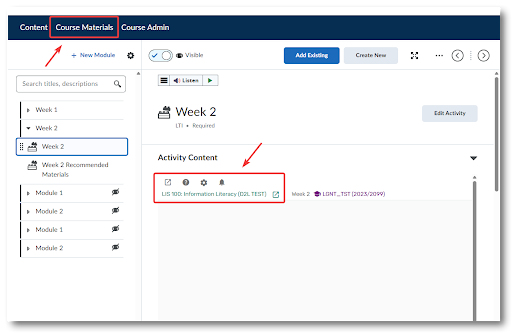
When trying to view a course materials list embedded within a week/module, the materials are not visible.
Workarounds:
1) Students and instructors can click the pop-out icons (box with an arrow) within the course materials item to open the full course materials list in a new window
2) Students and instructors can click the Course Materials link in the navigation bar to open the full list within D2L